With the Ministry of Road Transport & Highways pushing for full digitization under the Digital India initiative, Citizens can now update or link mobile number with their driving license online, without visiting the RTO.
How to Link Mobile Number with Driving License Online
In today’s digital-first India, your mobile number is more than just a contact—it’s your gateway to essential government services. Whether you’re renewing your driving license, checking traffic challans, or accessing DigiLocker, having your mobile number linked to your driving license ensures seamless access, secure verification, and timely updates.
This is a detailed article on How to Link Mobile Number with Driving License Online without visiting RTO Office. This guide will help you through the step-by-step process, using the official Sarathi Parivahan portal, so you can link mobile number with driving license. Whether you’re in Assam, Delhi, or any other state, this process is standardized and Aadhaar-based, making it easier than ever to stay connected with transport authorities.
Why Linking Your Mobile Number with Driving License is Important
Linking your mobile number with your driving license is now essential for accessing digital transport services in India. Whether you’re renewing your license, checking challans, or updating address details—your registered mobile number ensures secure OTP verification and timely alerts.
Step-by-Step Guide to Link Mobile Number with Driving License
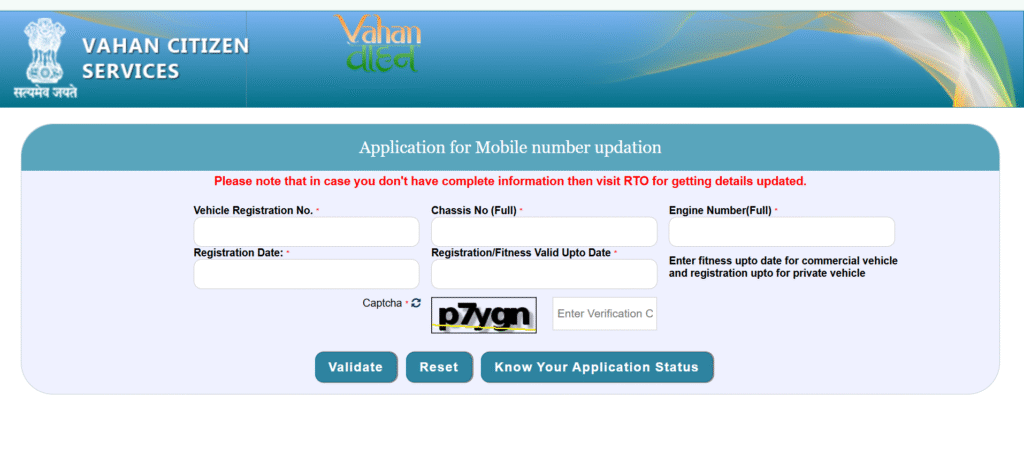
Step 1: Visit the Official Portal
Visit the official website of Sarathi Parivahan portal sarathi.parivahan.gov.in
Step 2: Select Your State
Choose the state where your driving license was issued (e.g., Assam, Maharashtra, Delhi).
Step 3: Navigate to “Update Mobile Number”
Click on “Update Mobile Number” under the Driving License Services section.
Step 4: Enter Your Details
- Driving License Number
- Date of Birth (as per DL)
- Captcha Code
Step 5: Aadhaar-Based OTP Verification
- Enter your Aadhaar-linked mobile number
- You’ll receive an OTP for authentication
- Submit the OTP to verify
Step 6: Confirmation
Once verified, your mobile number will be linked. You’ll receive an SMS confirmation from the portal.
Voter ID Card Apply Online 2025 – Track Status and Download PDF
Benefits of Linking Your Mobile Number with Driving License
Linking your mobile number with your driving license is no longer optional—it’s a vital step toward secure, efficient, and digital transport services in India. Here’s why every citizen should complete this update:
1. Instant Notifications & Alerts
- Receive SMS alerts for e-challans, license expiry, insurance renewals, and PUC reminders
- Stay informed about traffic rule changes, RTO updates, and DL status
2. Enhanced Security & OTP Verification
- All online services (renewal, address change, slot booking) require OTP authentication
- Prevents unauthorized access or misuse of your driving license details
- Adds a layer of Aadhaar-based identity protection
3. Access to Online RTO Services
- Enables contactless access to services like:
- DL Renewal
- Address Update
- Ownership Transfer
- Hypothecation Removal
- No need to visit RTO physically—complete tasks from your phone or computer
4. DigiLocker & mParivahan Integration
- Linked mobile number allows you to store and access your DL and RC digitally
- These digital documents are legally valid and accepted by traffic authorities
5. Accurate Government Records
- Helps transport departments maintain authentic, updated databases
- Reduces errors in challans, duplicate licenses, and vehicle ownership records
- Supports transparency and anti-corruption efforts
6. Emergency Communication
- In case of accidents or legal inquiries, authorities can quickly contact the registered owner
- Ensures timely coordination and support during emergencies
7. Supports Digital India & Paperless Governance
- Reduces paperwork, queues, and manual errors
- Promotes eco-friendly, efficient public service delivery
- Aligns with the Digital India mission for smart governance
Important Notes for Driving License Mobile Number Link or Updates
- Mandatory for Online Services: Linking is required to access RTO services like DL renewal, address change, and slot booking.
- Use Registered Mobile Number: Always use the number linked with Aadhaar or DigiLocker for seamless OTP verification.
- Avoid Multiple Registrations: Linking multiple numbers to one DL may cause authentication issues.
- Update if Number Changes: If you change your mobile number, update it immediately via Parivahan portal or nearest RTO.
- No Need to Visit RTO (in most cases): Linking and updates can be done online through https://parivahan.gov.in.
- Keep Number Active: Ensure your mobile number is active to receive alerts, e-challans, and renewal reminders.
- Check Status Regularly: Use mParivahan or DigiLocker to verify if your DL is correctly linked and digitally accessible.
Common Issues While Linking Your Mobile Number with Driving License
Despite the push for digital convenience, users often face technical and procedural hurdles. Here are the most reported problems:
1. Mismatch in Personal Details
- Name or Date of Birth on DL doesn’t match Aadhaar records
- Causes OTP failure or rejection during verification
2. Inactive or Unregistered Mobile Number
- Mobile number not linked with Aadhaar or DigiLocker
- SMS alerts and OTPs fail to deliver
3. Old Driving License Format
- Legacy DLs (pre-2019) may not be digitized in Sarathi database
- Requires manual update or RTO visit
4. Multiple DL Entries or Duplicate Records
- Some users have duplicate licenses or vehicle entries
- System flags errors during linking or update
5. Portal Glitches or Server Downtime
- Parivahan portal may be slow or unresponsive during peak hours
- OTP not received, page not loading, or session timeout
6. RTO Dependency in Some States
- Not all services are fully online in every region
- Users may still need to visit RTO for biometric or manual verification
7. Incorrect Entry of DL Number or Issue Date
- Even a small typo can block the linking process
- Always double-check DL details before submitting
Solutions to Common Issues related to Driving License Mobile Number Link or Updates
Facing trouble while linking your mobile number with your DL? Here’s how to fix it step-by-step:
1. Mismatch in Name or DOB
Issue: Aadhaar and DL details don’t match
Solution:
- Update your Aadhaar or DL via respective portals
- Use the Sarathi Parivahan portal to correct DL details: Sarathi Mobile Update Page
2. Inactive or Unlinked Mobile Number
Issue: OTP not received
Solution:
- Ensure your mobile number is linked with Aadhaar
- Visit UIDAI Mobile Update Page to update your Aadhaar-linked number
3. Old Driving License Format
Issue: DL not found in online database
Solution:
- Visit nearest RTO to digitize your DL
- Request entry into Sarathi database for online access
4. Duplicate or Multiple DL Entries
Issue: System shows conflicting records
Solution:
- File a correction request at RTO
- Carry Aadhaar, DL, and vehicle RC for verification
5. Portal Errors or Server Downtime
Issue: Page not loading, OTP delay
Solution:
- Try during non-peak hours (early morning or late evening)
- Use updated browsers like Chrome or Edge
- Clear cache or switch to mobile data
6. State-Specific Offline Requirements
Issue: Some services not available online
Solution:
- Check your state’s transport site or call RTO helpline
- In Assam, use Assam Transport Portal
7. Incorrect DL Number or Issue Date
Issue: Typing errors during submission
Solution:
- Double-check DL format (e.g., AS01 2020 1234567)
- Refer to DL smart card or physical copy for accurate entry
FAQs
Is it mandatory to link my mobile number with my driving license?
Yes. As per MoRTH guidelines, linking your mobile number is essential for accessing online RTO services, receiving e-challan alerts, and ensuring secure Aadhaar-based verification.
How can I link mobile number with Driving License online?
You must visit the Sarathi Parivahan Portal to update your mobile number. Enter your DL number, DOB, state, and complete Aadhaar OTP verification.
Can I link my mobile number without visiting the RTO?
Yes. Most states allow online linking via Aadhaar OTP. However, if your DL is not digitized or there’s a mismatch, you may need to visit the RTO.
What documents are needed for mobile number linking?
Driving License Number Date of Birth (as per DL); Aadhaar-linked mobile number; Aadhaar Card (for OTP verification)
How do I check if my mobile number is already linked?
Log in to the Sarathi Parivahan Portal and enter your DL details. If your number is already linked, it will be displayed. Otherwise, you’ll be prompted to update it
 Join WhatsApp Channel