Assam Power Distribution Company Limited (APDCL) has introduced smart meters to modernize electricity billing and improve transparency. If You are an APDCL consumer and using a Smart Meter, then you need to understand how to Recharge APDCL Smart Meter. In this article, You will understand APDCL Smart Meter Recharge & Online Balance Check Process.
Table of Contents
What is an APDCL Smart Prepaid Meter?
A Smart Prepaid Meter is a digital electricity meter that allows consumers to pay for electricity in advance. Instead of receiving a bill at the end of the month, Consumer recharge an amount in advance and can use electricity according to the amount available. Once the balance is low, the consumer is notified, and they can recharge accordingly.
Main Purpose of APDCL Smart Meter Recharge
APDCL has rolled out smart meters across Assam to:
- Reduce electricity theft
- Improve billing accuracy
- Empower customers with real-time usage tracking
- Enhance overall service delivery
Assam Police Constable Recruitment 2025 – Apply Online for 1,715 UB & AB Posts
APDCL Smart Meter Recharge & APDCL Balance Check
| APDCL Smart Meter Recharge Balance Check Link | |
| Official Website | Click Here |
| APDCL Smart Meter Recharge | Click Here |
| APDCL Smart Meter Balance Check | Click Here |
| Join Telegram Group | Click Here |
| Join WhatsApp Channel | Click Here |
Assam Online Mutual Transfer Portal 2025 – Click Here
How to Recharge APDCL Smart Meter
APDCL provides multiple ways to recharge your smart meter account. Below are the most popular and trusted methods:
1. APDCL Official Website
Follow these Steps to to Recharge APDCL Smart Meter
- Visit the official site of APDCL https://www.apdcl.org
- Click on “Smart Prepaid Recharge” or directly Click On the Link mentioned above table.
- Enter your Consumer Number (12-digit)
- Verify details and enter recharge amount
- Proceed to payment via UPI, Debit Card, Credit Card, Net Banking
- Upon successful payment, the recharge amount is instantly reflected
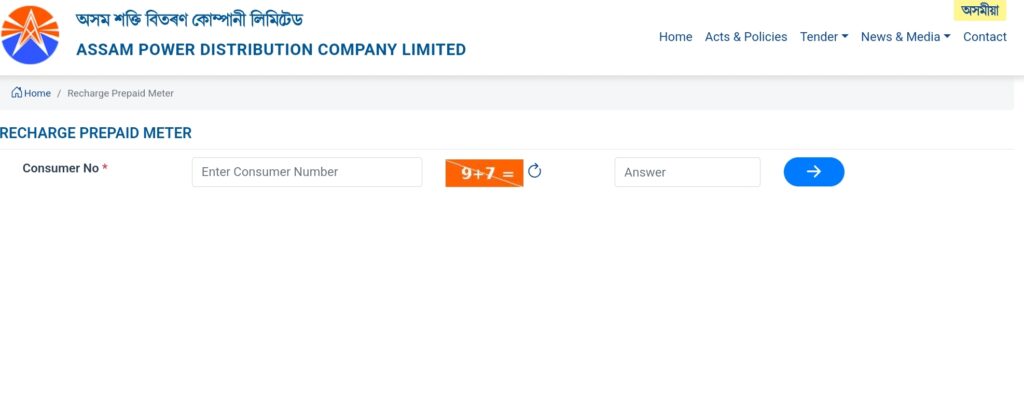
APDCL Smart Prepaid Recharge কেনেকৈ কৰিব
- APDCL-ৰ চৰকাৰী ৱেবছাইটটোলৈ যাওক: https://www.apdcl.org অথবা ওপৰৰ তালিকাত থকা লিংকত ক্লিক কৰক।
- “Smart Prepaid Recharge” বুটামত ক্লিক কৰক
- আপোনাৰ Consumer Number বা Meter Number প্ৰৱিষ্ট কৰক।
- বিৱৰণ যাচাই কৰক আৰু Recharge Amount প্ৰবিষ্ট কৰক।
- UPI, Debit Card, Credit Card বা Net Banking ৰ জৰিয়তে পেমেন্ট কৰক।
- পেমেন্ট সফল হ’লেই Recharge Amount তৎক্ষণাত প্ৰতিফলিত হয়।
2. APDCL Mobile App (Smart Consumer App)
Download from: Download APDCL MyBijulee App from Google Play Store or Apple App Store
Steps:
- Open the app and register/login with your consumer number
- Select “Recharge Smart Meter”
- Enter the amount and proceed with payment
- You will receive confirmation via SMS and in the app
3. Through Mobile Wallets (Paytm, PhonePe, Amazon Pay)
Follow the these Steps
- Open Paytm/ PhonePe/ Google Pay App
- Go to Electricity section
- Select Assam (APDCL – Prepaid)
- Enter your consumer ID and fetch the details
- Enter amount and pay using wallet, UPI or cards
- Recharge is usually updated within a few minutes
APDCL Smart Meter Balance Check Process
There are multiple ways to check APDCL smart meter balance:
- APDCL Official Website
- Visit https://www.apdcl.org
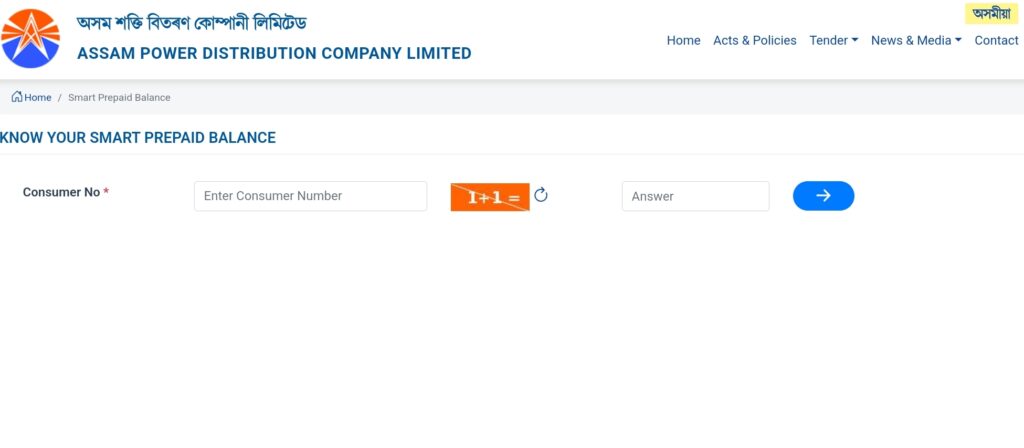
- Click on “Smart Prepaid Balance” or directly Click On the Link mentioned above table.
- Enter your Consumer Number and Captcha Number
- Via APDCL App: Login and go to “My Usage” or “Balance”
- SMS Notification: You get a balance alert after every recharge
- Using the Meter Screen: Press the scroll button on the smart meter to view the current balance
How Does the Prepaid Smart Meter Work?
Smart meters automatically record electricity usage in real-time and communicate the data to APDCL through a secure system. The meter deducts energy consumption from the recharged balance. When the balance nears zero, the user receives alerts via SMS or the APDCL mobile app.
Benefits of Using a Smart Meter
- Prepaid Convenience – Pay before use, just like a mobile recharge
- Recharge Anytime, Anywhere – Online recharge available 24/7
- Real-time Monitoring – Track electricity consumption in real-time
- Transparency – No estimated bills; pay only for what you use
- Energy Saving – Helps monitor and reduce electricity wastage
What Happens if APDCL Smart Meter Balance is Zero?
If your recharge balance reaches zero:
- The electricity supply will automatically be disconnected by the smart meter.
- You will receive alerts or SMS notifications before the disconnection.
- Power is restored immediately after a successful recharge.
Important Tips for Smart Meter Users
- Always double-check your Consumer Number before making any payment
- Keep the APDCL App installed for real-time alerts
- Recharge in advance to avoid sudden power cuts
APDCL Helpline and Support
- Customer Care Toll-Free: 1912 / 0361-2313069
- Email: apdclhelpdesk@gmail.com
- Official Website: https://www.apdcl.org

 Join WhatsApp Channel